
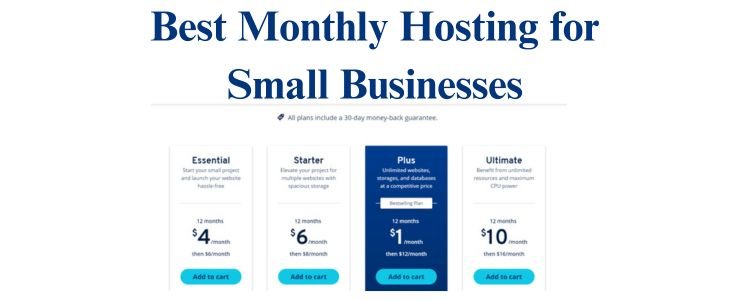
Most small business owners hesitate to launch a website because long-term hosting contracts feel risky. A barber shop, café, cleaner, or home-service business often wants something simple: pay monthly, avoid commitments, and test online visibility before investing more. The challenge is that many cheap hosting plans hide annual contracts behind “discounted” pricing. This guide cuts through that noise and shows you the best monthly hosting for small businesses, how month-to-month plans work, and which budget options deliver real value. By the end, you’ll know exactly what to choose — with no contract pressure.
Who Should Choose Month-to-Month Hosting?
Month-to-month hosting is designed for small businesses that want flexibility above everything else.
1. New Local Businesses Testing Demand
- A new barber opening in a residential area
- A café launching a website for the first time
- A small tutoring or coaching service
These owners don’t want a 12–36 month contract before knowing whether the site will actually bring customers.
2. Businesses With Seasonal Services
- Lawn care companies
- Pool cleaning
- Vacation rental hosts
- Photography services
Seasonal operations avoid paying during off-months.
3. Owners Still Figuring Out Their Website Needs
A small business owner may start with:
- a simple WordPress hosting setup
- a one-page site
- a basic portfolio
Once the business grows, they may need:
- more storage
- a faster server
- better analytics
Paying monthly keeps choices open.
4. Those Who Want Zero Front-End Costs
Month-to-month hosting is perfect for those who:
- can’t pay 2–3 years upfront
- want to test hosting speed first
- want freedom to change providers quickly
If your goal is to minimize risk while building a small business website, monthly hosting is the safest entry point.
Pros & Cons of No-Contract Hosting vs Annual Plans
Choosing monthly hosting gives you flexibility, but it also has trade-offs. Understanding the difference helps you avoid expensive mistakes.
Pros of Month-to-Month Hosting
1. No Long Contracts
You can cancel anytime.
Perfect for a local business figuring out online presence.
2. Low Starting Cost
Only pay $5–$15 per month depending on provider — without committing hundreds.
3. Easy Upgrading
If your site grows fast, you can scale up immediately.
4. Great for Testing Hosts
You can compare:
- speed
- support quality
- uptime
- ease of WordPress hosting
before locking into an annual deal.
Cons of Month-to-Month Hosting
1. Higher Monthly Price
Annual plans often look cheaper on paper, but they require:
- 12 months
- 24 months
- 36 months
paid upfront.
Monthly billing is always higher:
- $2.99 → becomes $7.99/mo if paid monthly
- $1.88 → becomes $4.48/mo monthly
2. Fewer Freebies
Monthly plans rarely include:
- free domain
- long-term email
- free backups
3. Cancel Anytime = Host Cares Less
Since you’re not locked in:
- monthly hosting usually has fewer renewal benefits
- you may get slower support on cheaper plans
4. Higher Entry Price for Premium Hosts
Cloudways monthly pricing is strong but not ultra-cheap:
- $11–$14 per month
- but extremely reliable
If you need affordable hosting first, start simple — then scale.
Best Monthly Hosting Providers for USA Small Businesses
These providers offer true month-to-month hosting suitable for local business websites.
We focus on:
- USA servers
- beginner-friendly dashboards
- simple WordPress hosting
- clean pricing
- clear cancellation options
1. Hostinger — Best Budget Monthly Option for Local Businesses
Hostinger is reliable, fast, beginner-friendly, and one of the few hosts that offer monthly billing without tricks.
Why Hostinger Works for Small Businesses
- Strong USA servers
- Easy WordPress setup (1-click)
- Free SSL
- Consistent uptime
- Simple dashboard
- Great for a local business website or portfolio
A barber shop, small café, or home-cleaning business will run smoothly on the monthly plan.
Hostinger Monthly Price
- Starts around $9.99/month (monthly billing)
- Annual billing: $2.49–$2.99/month
Monthly is more expensive, but ideal for testing.
2. Namecheap — Best Low-Renewal Monthly Option
Namecheap is one of the few hosting companies where monthly pricing is predictable.
Why Namecheap Works
- Very transparent pricing
- Low renewal costs
- Beginner-friendly
- Good performance for small sites
- Great documentation
Perfect for:
- freelancers
- tutors
- coaches
- small local businesses needing a simple WordPress site
Namecheap Monthly Price
- $4–$5/month (monthly)
- Annual: $1.88–$2.18/month
For month-to-month users, Namecheap gives the best long-term stability.
3. Cloudways — Best Monthly Option for Growing Businesses
Cloudways is not “cheap hosting,” but it offers industry-leading month-to-month billing and performance.
Best For
- online coaching businesses
- service businesses needing fast websites
- restaurants posting daily photos
- multi-location businesses
- businesses expecting more traffic
Cloudways gives:
- premium speed
- managed security
- automatic backups
- scalable WordPress hosting
- USA servers with excellent stability
Cloudways Monthly Price
Starts at:
-
$11–$14/month
It’s not ultra-budget, but it’s extremely strong for performance.
Comparison Table: Monthly Prices, Renewal, Features
| Hosting Provider | Monthly Price | Annual Price (Optional) | Websites Allowed | Backups | Server Locations | Best For | |
|---|---|---|---|---|---|---|---|
| Hostinger | ~$9.99/mo | $2.49–$2.99/mo | 1 | Included | Add-on | USA, Europe, Asia | Local business websites |
| Namecheap | ~$4.48/mo | $1.88–$2.18/mo | 3 | 2 months free | Weekly | USA, UK | Low-budget beginners |
| Cloudways | $11–$14/mo | No annual discounts | Unlimited apps | Paid add-on | Automatic | USA, Europe | Growing businesses |
| Bluehost | ~$10.99/mo | ~$2.95/mo | 1 | Included | Included | USA | Small WordPress sites |
| iPage | ~$12/mo | ~$1.99/mo | 1 | Included | Add-on | USA | Basic brochure sites |
Note:
Monthly hosting is always more expensive upfront but far safer for testing and budgeting.
Best Option for New Local Businesses Testing Online Presence
If you own a:
- barbershop
- cleaning service
- small restaurant
- bakery
- coaching practice
- home-service business
you don’t need advanced hosting yet.
Here’s the best breakdown:
Best for Non-Technical Owners → Hostinger Monthly
Simple. Fast. Reliable.
Perfect for “set it and forget it” local business sites.
Best for Lowest Monthly Cost → Namecheap Monthly
Clean pricing, predictable renewals, and beginner-friendly.
Best for Serious Growth → Cloudways Monthly
Ideal for businesses expecting:
- more traffic
- more images
- faster load times
- better SEO performance
Cloudways is the ceiling — but you only need it once your local business grows.
Step-by-Step: Setting Up a Month-to-Month Hosting Account
Small business owners don’t want a complicated onboarding process.
Here’s the practical, 7-step approach:
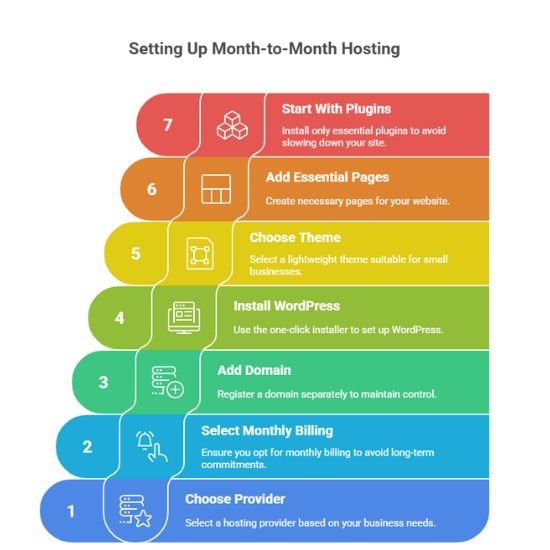
Step 1: Choose Your Hosting Provider
Use this rule:
- Hostinger → best mix of quality + beginner-friendly
- Namecheap → best low-cost monthly
- Cloudways → best performance
Pick based on your business stage.
Step 2: Select “Monthly Billing”
Make sure you switch to monthly billing so you don’t get locked into yearly pricing automatically.
Step 3: Add a Domain
You can:
- buy a domain from Namecheap
- or from the hosting provider (less recommended for monthly users)
Pro move:
Register domains separately to avoid lock-in.
Step 4: Install WordPress
Most local business websites use WordPress because:
- easy to edit
- beginner-friendly
- huge plugin support
- great for SEO
- works with small business templates
Use the one-click WordPress installer.
Step 5: Choose a Small-Business Theme
- Astra
- Kadence
- Neve
- Blocksy
Lightweight themes work best with affordable hosting.
Step 6: Add Essential Pages
Every local business website needs:
- Home
- About
- Services
- Location / Service Area
- Contact
- Reviews
- Gallery (optional)
Keep it clean and simple.
Step 7: Start With Minimal Plugins
Only install:
- a caching plugin
- security plugin
- image optimization plugin
- form plugin
Too many plugins slow down cheap hosting.
How to Switch to Annual Once You’re Confident
Once your local business begins seeing website traction, switching to annual hosting can save a lot of money.
When to Switch
Switch to annual hosting when:
- your site loads reliably
- you’re comfortable with the host
- your business benefits from the website
- the monthly spending adds up
Signs You’re Ready
- You’re receiving 10–30 inquiries per month.
- Customers find you through Google or local searches.
- You’ve added business hours, photos, and service pages.
- Your WordPress hosting is stable and easy to manage.
How to Lock in Savings
- Wait for Black Friday (biggest hosting discounts)
- Switch to a 12–36 month plan
- Use US-based servers for local SEO
- Back up your site before switching
This gives you the best combination of:
- affordability
- stability
- security
- performance
Final Verdict: Choose the Right Monthly Hosting and Start Today
Monthly hosting gives USA small business owners the freedom to test a website without long contracts or large upfront costs. Whether you choose Hostinger for simplicity, Namecheap for affordability, or Cloudways for power, each option supports a small business website effectively. Start small with monthly billing, build your online presence, and switch to annual plans once your business sees real value.
Pick a host, create your site, and begin building your local online presence today.